

Friendly Reminder for Families
Have you checked your student's lunch account balance recently!
Do you need help knowing where to check their balance and how to pay online?
WE CAN HELP!
Log into your Parent PowerSchool account from your computer
1. Select your student
2. Go to the left side of the screen and select Balance
3. Your student's Meal Transaction - Current Balance will pop up. You will be able to see a ledger of all charges and deposits
4. You can send a check or cash with your student to school, and they can pay their balance or add money to their lunch account
5. OR you can make a payment on your student's account by clicking on the eFunds for schools' link
This will take you directly to the eFunds portal to make your payment online
You can also get to the eFunds for schools link by going to our schools web page and across the top of the front page, select FAMILIES
Then select Lunch & ASB Payments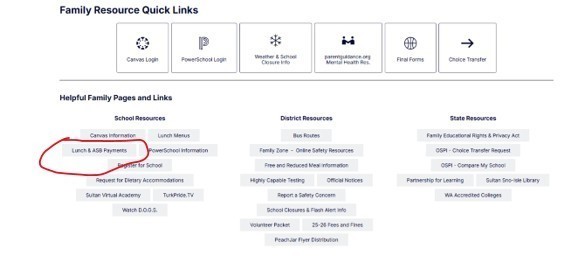
Once you have clicked on Lunch & ASB Payments this will take you directly to the eFunds link to pay on your students lunch account.
And, of course, you can always send cash or check with your student to school and we can add it to their lunch account.
If you’re unsure how to log in or don’t know which system to use, we’re happy to help!
Please contact the school office for assistance—we can walk you through it.
Thank you.